Warp
Imagine a roomful of devices with a thousand photos to resize. Warp shares the pile: each device takes work and puts answers back.
Share the pile
Each photo becomes a job on a shared list. Devices work out which jobs belong to them, with no central boss handing out work.
Each device puts its answers on a shared board. Other devices pick them up as their copies catch up; your app reads its own copy.
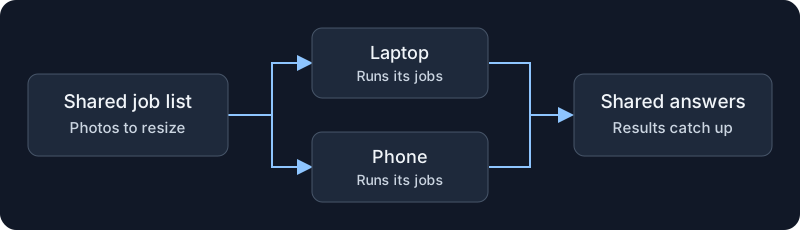
The parts are familiar: connect devices, share a list, merge answers. Warp puts them together. Your app adds jobs and reads results.
When a device goes quiet
A phone drops off the network halfway through a photo. Another device can pick up its work—but silence does not mean the phone stopped.
So a job can run more than once. The answer board keeps one result per job, but it cannot undo work outside Warp. Resizing the same photo twice can be harmless. Sending the same email twice is not.
Choose jobs that are safe to repeat. For work that needs an agreed order, Warp also has a path where the group agrees before a device acts. Following a job explains both paths and their limits.
When another team joins
Now a second team adds photos. Who gets how much of the room? A team with twice the share should get roughly twice the service while both have work waiting.
That is Heddle's part of the story. Warp chooses where a job runs. Heddle controls how much work each team may start.
Take a closer look
Follow a job from the shared list to its answer, through a lost connection and a retry.
Plan the work to do less of it before the devices need to agree on a result.
Make each job faster by letting one device improve a program and share that copy with the others.
All three have working code. The wider vision asks how close this could feel to running code on one computer. That remains an idea to explore.